

Peter Cuhalev Message me

Available from November 2026 · Remote

Product designer & builder for
technical platforms.

Hi, I'm Peter. I shape how complex systems look and connect at a human level, design the experience people use, and ship with AI.

From streaming data to EV payments, complex products made simple.

As a senior product designer & builder, I turn technical, complex systems into interfaces regular people can use, across big data and analytics, computer vision, EV charging and fintech, plus other enterprise projects.

Working as a bridge between product, business and technology shows me where the value is for users and how to present it. Knowing how the technology works means I know its limits, so solutions stay practical and ship sooner.

With AI, that means creating design systems AI can build from, and prototypes on the real codebase.

At the end of the day, I make things that get shipped, not things that stay in a drawer.

Companies I've worked with

  • Road, EV Charging & Transactions
  • Plainsight, AI Computer Vision
  • Bottlenose, BI Analytics

Selected work

Dashboards, apps and data platforms, across different companies.

  1. 01Road Dashboard
  2. 02Road Mobile App
  3. 03Plainsight Platform
  4. 04Bottlenose Platform
  5. 05Alvenra Side Project

Designing Road’s platform, and the system AI builds from

Road Head of Product Design EV Charging & Transactions 2022–2026

1 week → 1 dayto a first story draft

Road runs pricing, payments and payouts for EV charging. I led product and visual design across its dashboard for end customers and its internal admin tooling, then wrote the design system AI builds from. Product and engineering now prototype with valid UI, and design spends its time on the experience and on checking we’re solving a real problem.

  • One dashboard, three user groups

    End customers, provider admins and system admins, designed as one product around pricing, payments and payouts.

  • A design system AI builds from

    Patterns, tokens, templates and blocks, so AI assembles on-pattern UI instead of inventing it.

  • Adopted by product first, then engineering

    Both teams now build from the same system, as Road moved to an AI-first way of building.
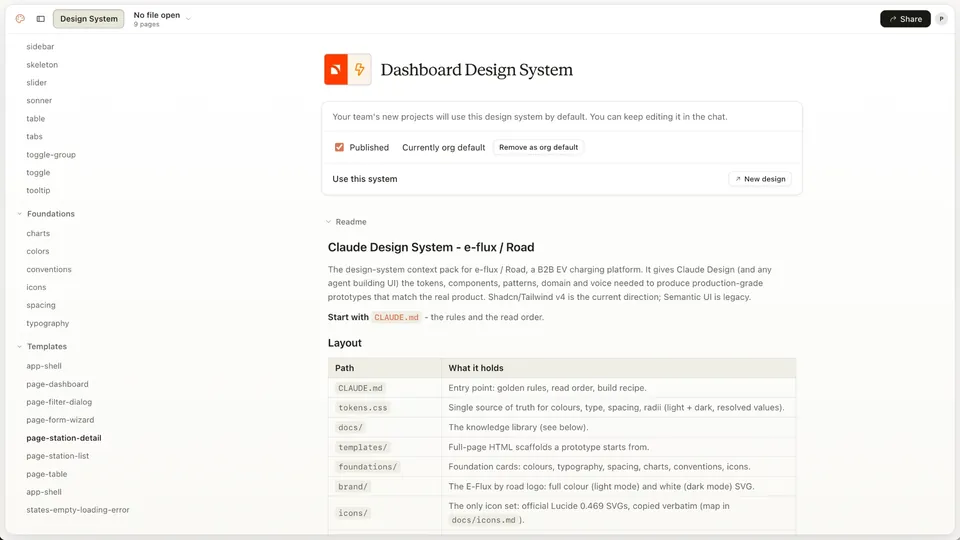
The Road design system readme: rules, tokens, templates and icons.
Design system. AI context with definitions, values and templates.
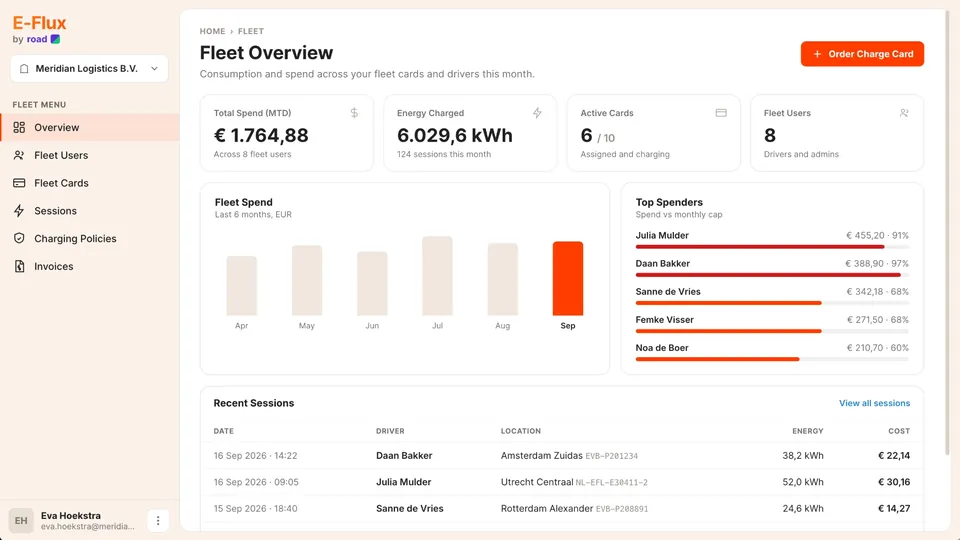
Fleet overview from a first AI pass on basic definitions.
First pass from AI. Basic definitions, lacking domain knowledge.
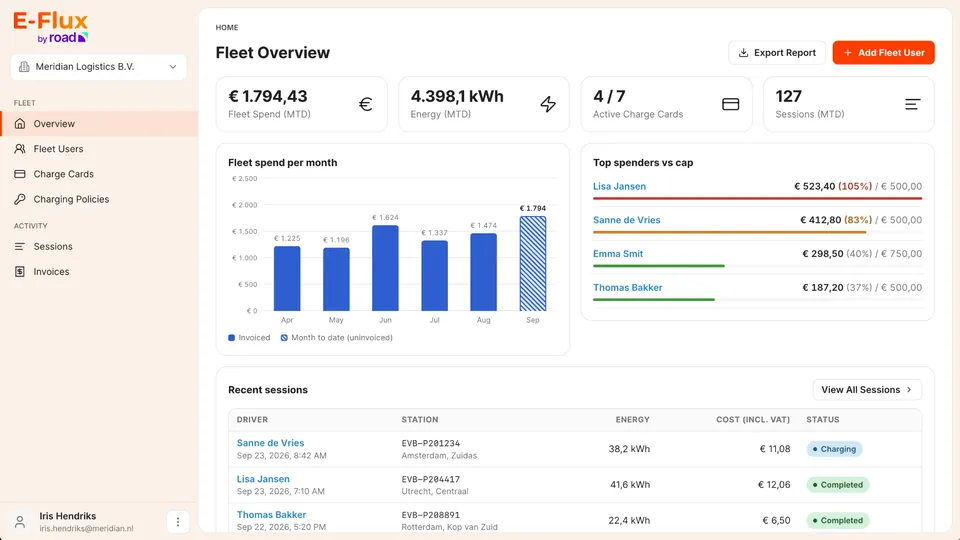
Hardened Road fleet overview with spend, caps and sessions. Placeholder data.
Full context. With complete domain knowledge, after testing.
1 / 3

Charging and paying from your phone, with or without a charge card

Road Senior Product Designer & Product Manager EV Charging & Transactions 2022–2026

350,000+downloads across iOS and Android

Road’s app lets EV drivers find a charger, start and stop a charge, pay, and manage their charge cards. When I joined it was a basic build from an external agency. I brought product and design in house, released the new app within six months, and designed paying in the app. It became a companion for drivers with a charge card, and a way for occasional drivers to pay without ordering one.

  • Pay in the app

    A full payment solution for EV charging, designed from scratch, so occasional drivers can charge without ordering a card.

  • One app, 10+ brands

    E-Flux by Road, plus white-label apps for more than ten customers, built from the same product.

  • Built from the dashboard system

    A mobile design system that kept the dashboard’s core components, tailored to the phone.

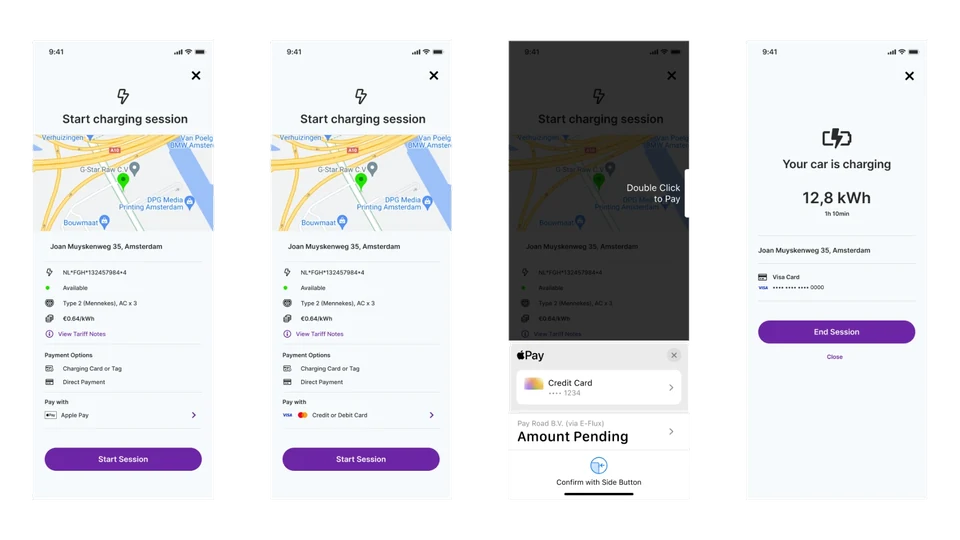
Starting a charging session with Apple Pay or a card, confirming the payment, and the charging screen with an End Session button.
Direct payment. Start a charge and pay in the app, by card, Apple Pay or Google Pay.
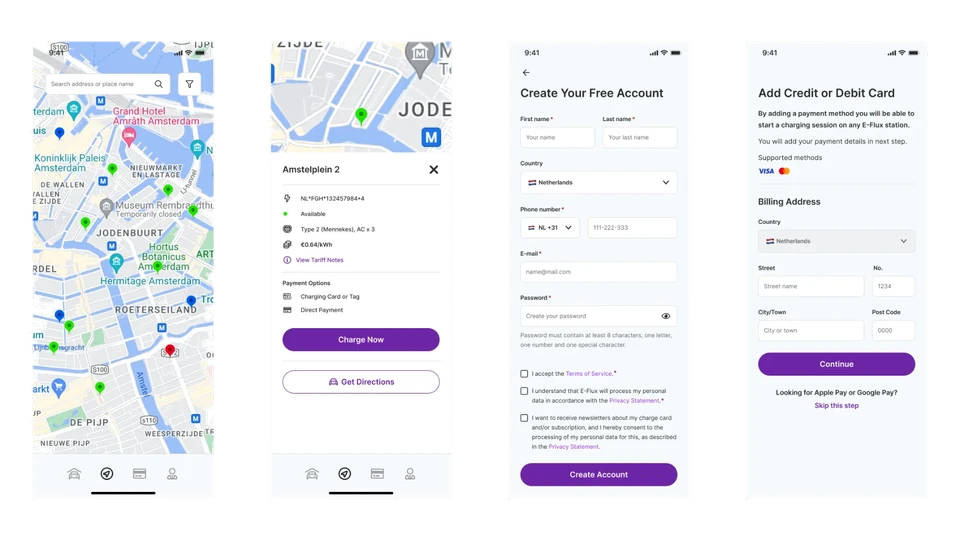
Station map, station details with price and payment options, account sign-up, and adding a credit or debit card.
Find a station. Sign up, add a card and start charging.
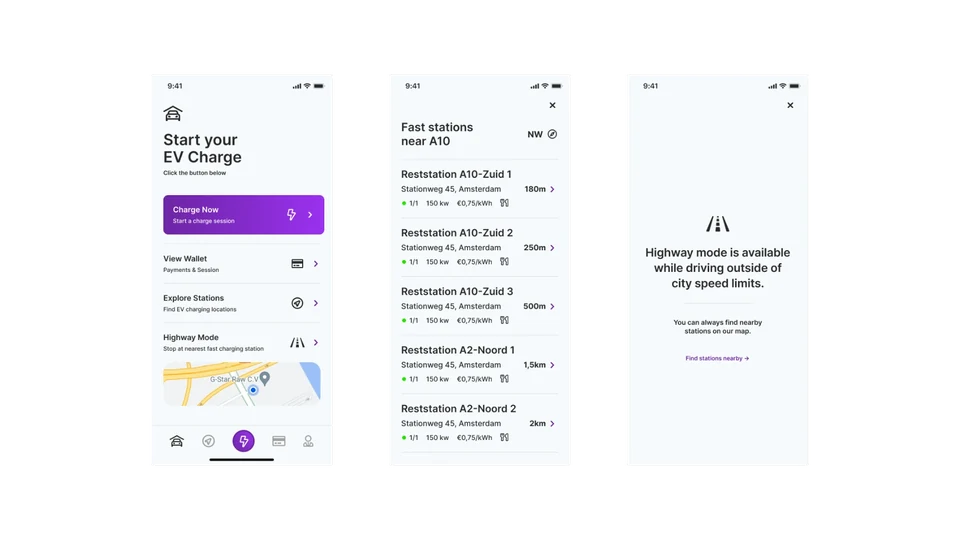
Home screen with Highway Mode, a list of fast stations near the A10, and the message shown when driving inside city speed limits.
Highway mode. The nearest fast stations in the direction you’re driving.
1 / 3

Computer vision without a machine learning expert

Plainsight Lead Senior Product & UX Designer, Product Owner AI Computer Vision 2017–2022

Multiple tools → 1 flowfrom raw images to a deployed model in use

Plainsight began as an engineering-built demo, split across separate tools with no way to deploy. I redesigned the platform and designed Sense 3.0 end to end, so non-technical users could train and deploy models. It brought the first paying customers.

  • One flow instead of multiple separate tools

    Every step visible up front: gather, annotate, train, deploy, run.

  • One person can do it all

    Larger teams could still give specialists access to their own steps.

  • Templates by use case

    Users saw their outcome first, with full configuration kept for ML experts.

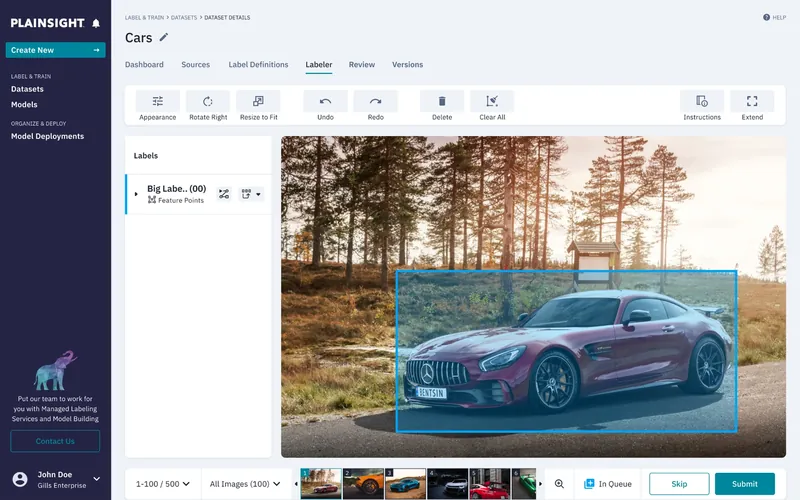
Plainsight labeler with a bounding box around a car. Placeholder data.
Annotate your inputs. The first of the tools a non-expert needs.
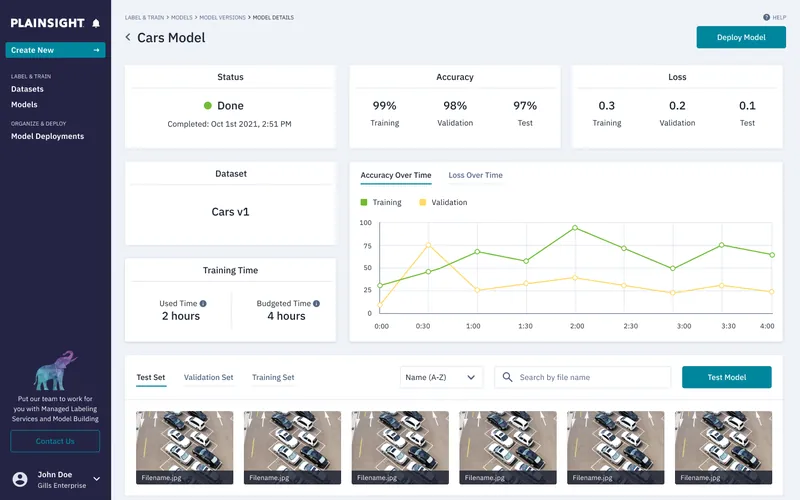
Plainsight model details with accuracy, loss and training time.
Train on your own dataset. Accuracy, loss and training time against budget.
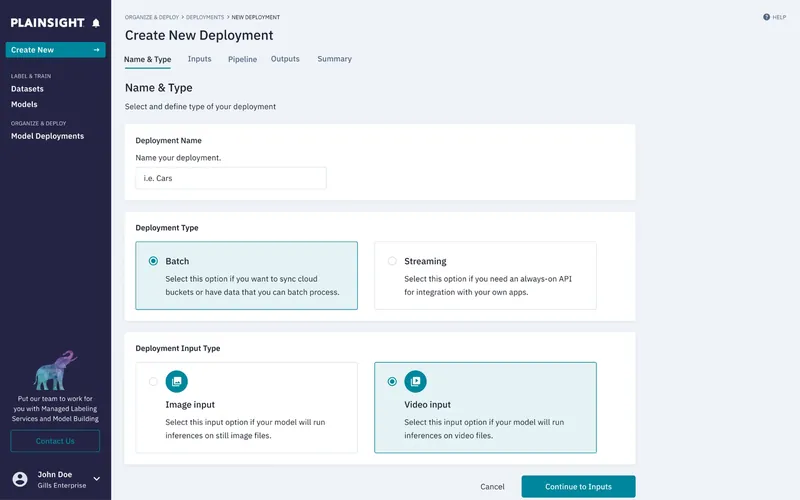
Plainsight new deployment with batch or streaming choices.
Deploy where needed. Batch or streaming, image or video, each option explained in plain language.
1 / 3

Finding the trend in streaming data, before it grows

Bottlenose UX Designer BI Analytics 2011–2016

Cool VendorGartner, 2016

Bottlenose grew from social listening into a business intelligence platform that spotted trends early in social conversations, used by analysts and media teams at companies like Pepsi. I joined in 2011 as the first design hire, built its first pattern library and coded the front end, then took on more UX and UI direction as we moved from a consumer product to enterprise.

  • Signal from the noise

    Trend scores and change over time next to the data, so analysts could trust what the system surfaced.

  • A pattern library from 2011

    Our own components and templates, so every new page and feature was built from the same parts.

  • Alerts and reports

    Keyword alerts and daily or weekly reports, so teams could follow their campaigns without watching the stream.

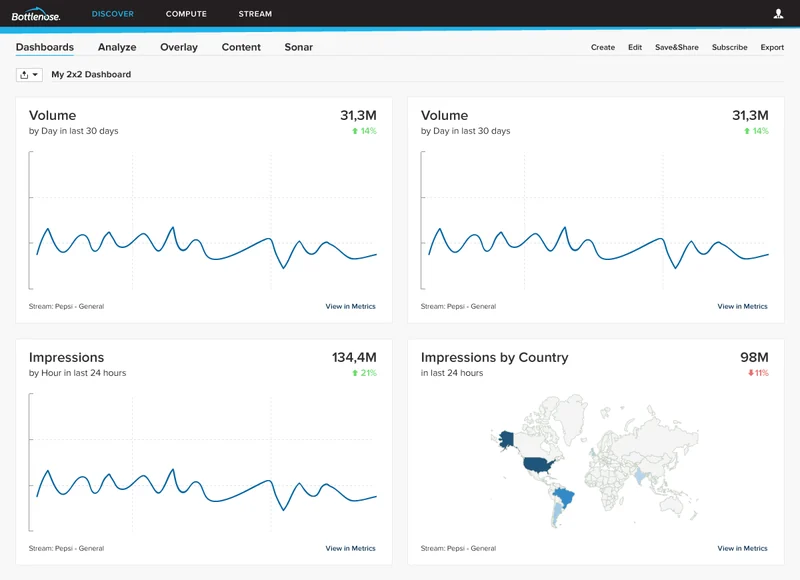
A 2×2 dashboard for a Pepsi stream: volume and impressions over time, and impressions by country on a world map.
Dashboards. The key numbers for a stream at a glance, with change over time.
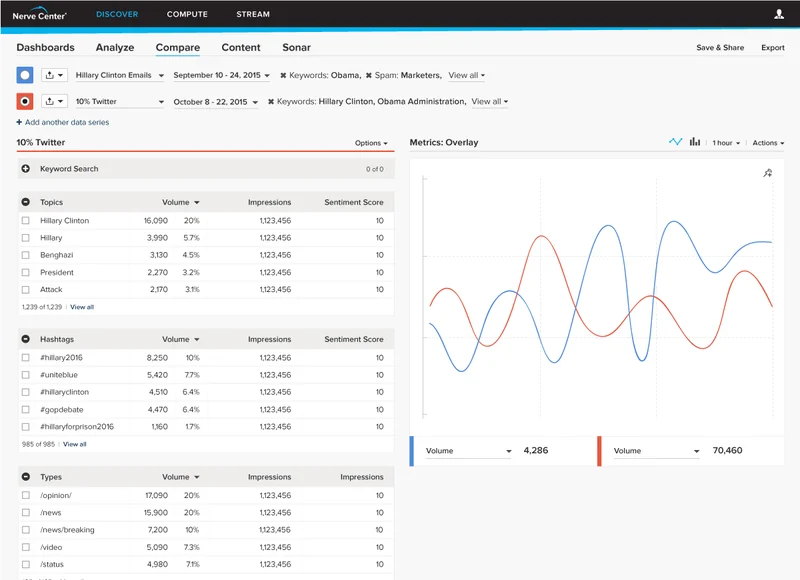
Compare view: two data series with their topics and hashtags ranked by volume, overlaid on one line chart.
Compare. Two data series side by side, on one chart.
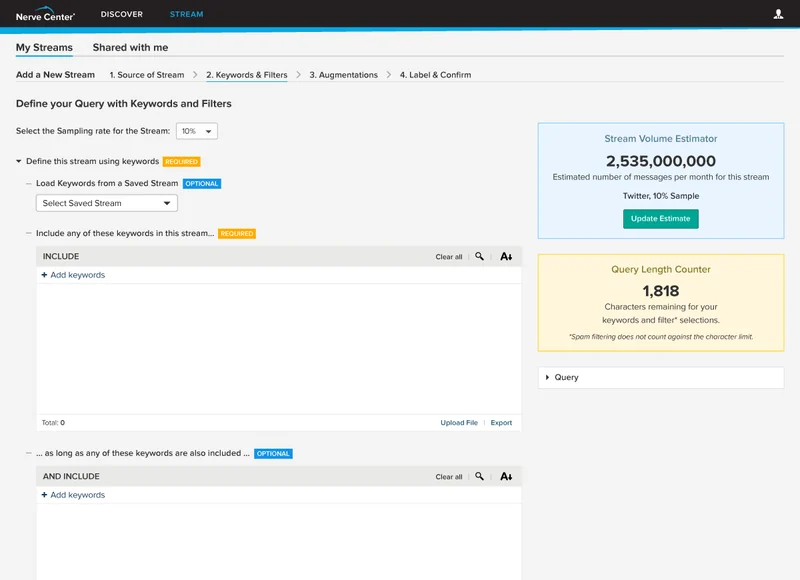
Creating a new stream, step 2 of 4: include, and-include and exclude keywords, with a stream volume estimator and query length counter.
Create a stream. Keywords and filters, with an estimate of how big the stream will be.
1 / 3
Live preview

A sound meditation app, from idea to live product with AI

Alvenra Concept, product, design and front-end Side project

Idea → livedesigned and built end to end with AI

Long-form guided sound meditation, with intention setting and integration, isn’t available digitally. I defined the product, flow and visual style first, then built it with AI, well past the first prototype.

  • Defined before building

    Idea, flow and visual style written first, so AI worked from a clear definition.

  • Past the first prototype

    A cymatics visualizer refined over many rounds to production quality.

  • Fixed what breaks the experience

    Audio now keeps playing with the phone locked.

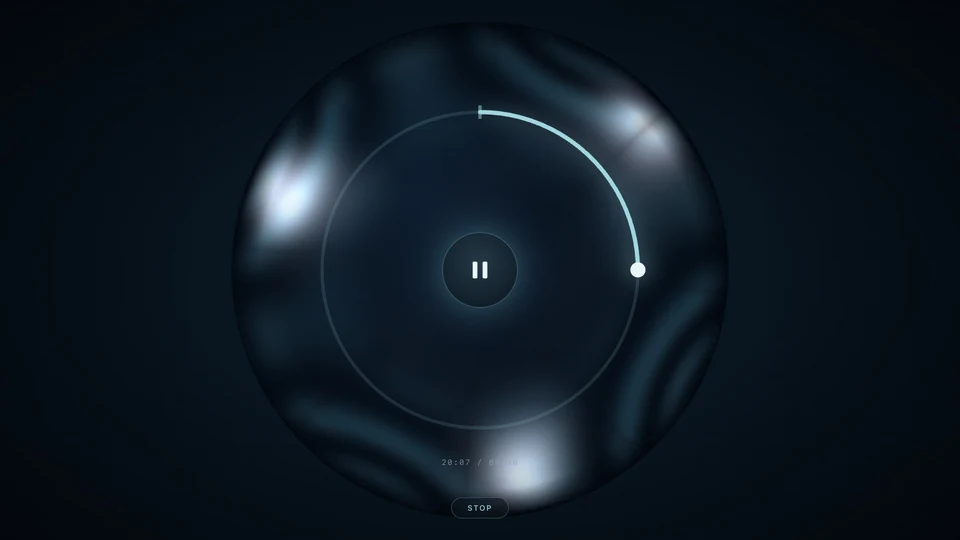
Alvenra session with a cymatics pattern and progress ring.
During. One control, nothing else.
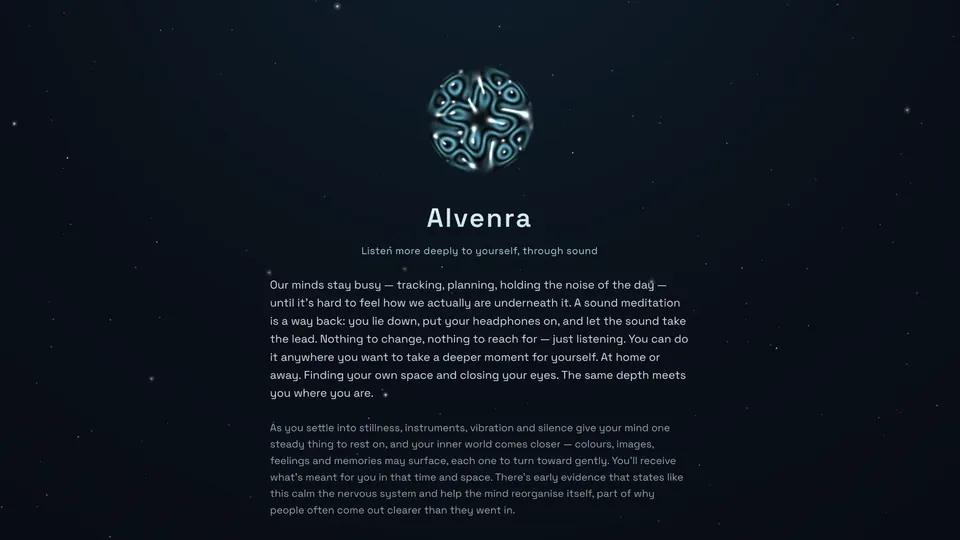
Alvenra intro: a cymatics orb over a night sky.
Before. Setting the intention.
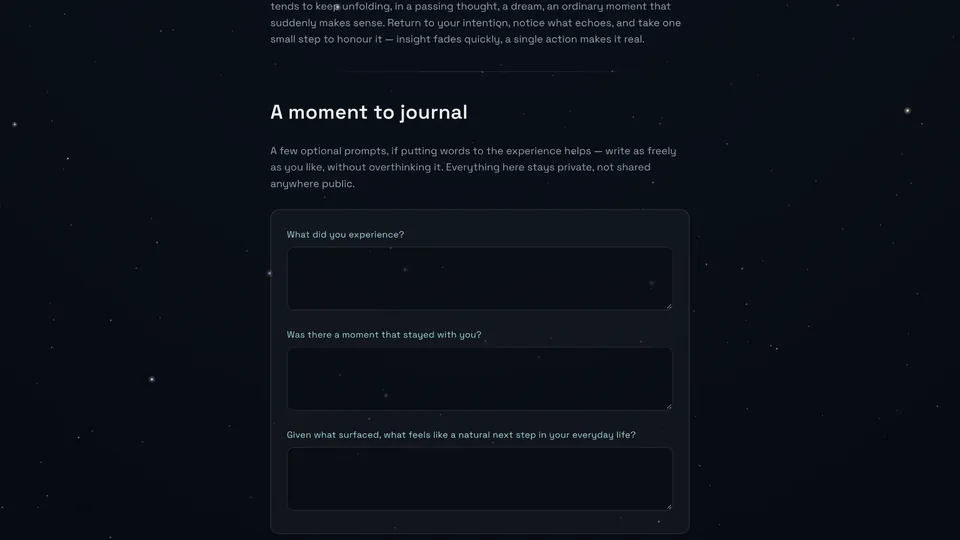
Alvenra journal step with private prompts.
After. Private journaling.
1 / 3

Designing with AI

AI is part of every working day for me now, from product research and first ideas to prototypes and checking UI before it ships. Here’s how I use it, what I’ve learned, and where I think it’s heading.

Daily toolsClaude, Claude Code, Figma AI agents

Day to day

  • Specs before prompts

    I start from my own understanding: specs and definitions, or a story the team brings in. That sets the parameters before AI touches anything.

  • AI makes the first draft

    Claude and Claude Code turn that into a first draft and a few explorations, so I can see options instead of imagining them. On bigger projects, Figma is still where I explore design-only features and set up the system.

  • I choose and refine

    I pick the direction that works, prompt specific changes until it fits the system, then tweak by hand on top of what AI made.

  • Checked before anyone sees it

    Output runs through design specs and review checks first, so my review can focus on value, not inconsistencies. Then it goes to a client, a customer or production.

What I’ve learned

  • AI gets you to a solid solution much faster

    Tweaking and validating still take about the same time, if you don’t want to ship AI slop.

  • Sometimes my hands are faster

    When I know exactly what I want, making it myself beats many rounds of prompts. It depends on the feature.

  • It’s only as good as our definitions

    I first expected finished designs with nothing to tweak. We keep adapting as people, and so do the definitions AI works from.

Where it’s heading

  • Design moves toward judgement

    More product thinking and deciding what’s good, plus the craft and visual cues that keep a product unique and human.

  • Checks built into the system

    Product design specs, review and polish steps that every AI output passes through, so mistakes surface early and gaps close sooner.

Ways to work together

I join teams full-time, working remotely with on-site visits.
I’m also available for project work.

Product designer & builder,
joining your team.

Product thinking, UX and visual design across your platform, with AI-assisted prototyping on your real codebase. Working alongside product and engineering every day.

Available
Location
November 2026
Remote, with on‑site visitsBased in Slovenia, EU
Message me

Project work

  • Product and UX design

    A feature, a flow or a whole platform, from definition and user journeys to the visual details people feel.

  • Design system and UX review

    An assessment of your system, patterns and flows, with a clear list of what to fix first.

  • AI-ready design systems and process

    Structure your system and workflow so AI builds from it accurately, without losing design quality.

Experience

Designing products across streaming data, computer vision and EV charging, from print and web to co-founding a startup and leading product design.

  1. 2022–2026RoadEV Charging & TransactionsHead of Product Design · Senior Product Designer · Product Manager (Mobile App)
  2. 2017–2022PlainsightAI Computer VisionLead Senior Product & UX Designer · Product Owner
  3. 2011–2016BottlenoseBI AnalyticsUX Designer
  4. 2009–2012PreonaWeb, Browser Plugin, iOS AppCo-founder and CPO
  5. 2005–2008Various companiesPrint and webGraphic and Web Designer

Let's talk about your product.

Hiring for a product design position, or want a second pair of eyes on your design system?

Email is the fastest way to reach me:

peter@yukaii.com